

blog
Azure AD – Removing Inactive Azure AD Pass-through Agent
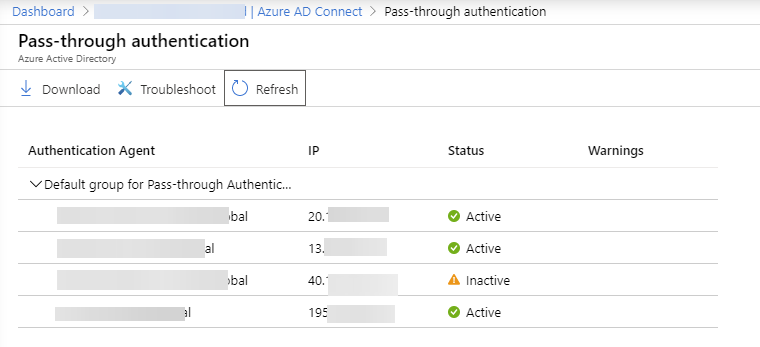
If you remove a server that previously hosted a Pass-through Authentication agent, the Microsoft Entra admin center can keep showing that agent as Inactive for a while. At first glance it looks like a cleanup problem, but in most cases it is expected behavior rather than a failed uninstall.
Quick answer
You usually do not remove the inactive entry manually from the portal. Once the Authentication Agent is uninstalled, the stale record can stay visible for some time and then disappear on its own.
What to check before you ignore it
Make sure all of the following are true:
- The old server really has both components removed:
Microsoft Entra Connect Authentication AgentMicrosoft Entra Connect Agent Updater
- You still have at least one other active authentication agent if the tenant is using Pass-through Authentication.
- Sign-ins are working before you retire the last server involved in authentication.
Why this happens
The portal tracks registered agents separately from the local server state. After uninstall, the tenant can still remember the old agent identity for a while, so the blade shows it as inactive until the service ages that record out.
Current note
This post was originally written when the product was called Azure AD. As of April 22, 2026, the current Microsoft documentation refers to the service as Microsoft Entra ID and states that an uninstalled Pass-through Authentication agent is automatically removed from the list after 10 days.
If you are migrating from AD FS or replacing Entra Connect servers, treat an inactive entry as expected unless it is your only agent or users are actively failing to sign in.