

blog
CollectGuestLogs.exe – High Disk Usage on Azure VM
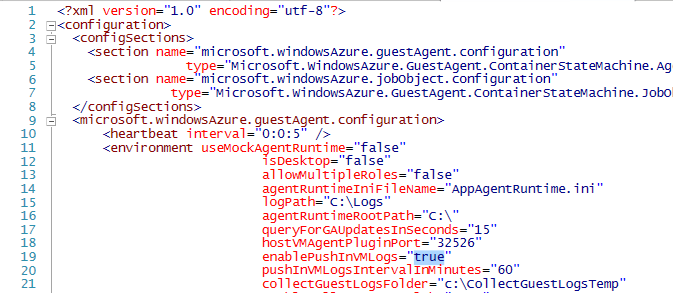
CollectGuestLogs.exe is part of the Azure Windows Guest Agent tooling, and under normal conditions you rarely notice it. In one customer environment, however, it became the main source of disk activity and made the VM feel slow almost all the time.
While investigating the performance problem, I noticed the process was doing heavy reads against Security.evtx. Once that log grew large enough, the process appeared to get stuck in a constant read/write loop. In our case the disk impact ranged from roughly 5 MB/s to 30 MB/s, which was more than enough to hurt the machine.

What I changed
- Open
C:\WindowsAzure
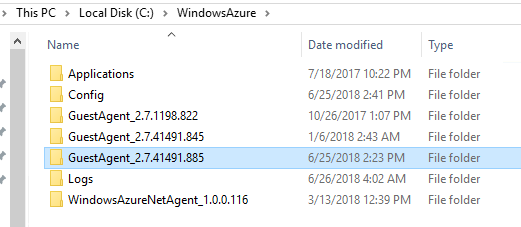
- Find the newest version of the Guest Agent
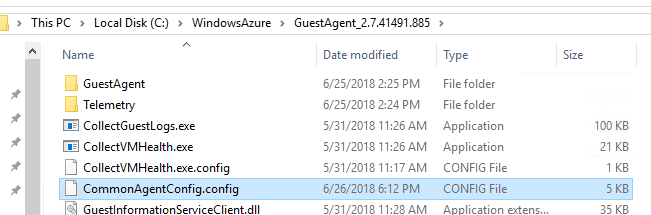
- Open
CommonAgentConfig.config
- Find
enablePushInVMLogsand set it tofalse - Restart the RDAgent service
Why this helps
This reduces the guest-agent log push behavior that was triggering the constant disk churn in the environment I was working on. In our case, that was enough to stop the sustained disk pressure and bring the VM back to normal responsiveness.
Current note
Microsoft still documents CollectGuestLogs.exe as part of the Azure Windows Guest Agent automatic log collection feature on Azure VMs. So even though this post describes an older field workaround, the process itself is still real and still part of Azure VM guest diagnostics.
As always with agent-level changes, treat this as a targeted troubleshooting step. If you rely on those guest logs for support workflows or diagnostics, make sure you understand what you are reducing before you leave the setting disabled.