

blog
Write-Color – 2 year Anniversary Edition – v0.3
That was a bit unexpected. The day I revisit Write-Color for PowerShell to release new version of Write-Color after some minor changes it turns out my original version was released 2 years ago, exactly on 9th of April 2016! What is Write-Color you may ask… I hear you.. well it's a wrapper for Write-Host. It allows you to create, in an easy way, a colorized version of your script output, among other things.
Please notice this article **contains parts of information **(still useful) and may not reflect all functionalities of this module. For download, source code and so on you should refer to the dedicated **PSWriteColor **module page. After reading this one… of course! It contains useful information, *examples *and know-how.
💡 What is it all about?
I understand now… but what is it? Well lets take a look at example…
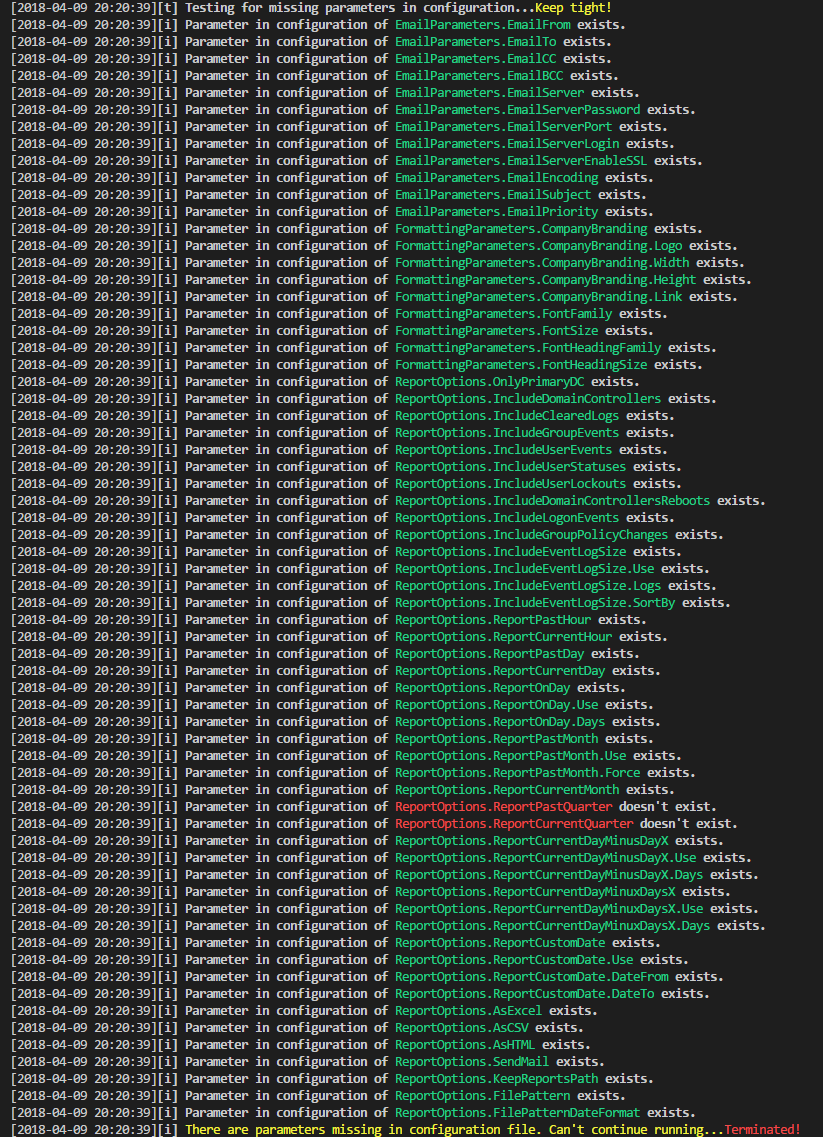
Normally it would take lots of code to achieve something similar. But with Write-Color it's quite easy. Each one is single line of code:
Clear-Host
. "C:\Support\Scripts\Includes\Write-Color.ps1" # Include Write-Color

Write-Color "[i] ", "Parameter in configuration of ", "EmailParameters.EmailFrom", " exists." -Color White, White, Green, White -ShowTime
Write-Color "[i] ", "Parameter in configuration of ", "EmailParameters.EmailTo", " exists." -Color White, White, Green, White -ShowTime
Now how about writing a command and then after it's done, and depending if it's Success or Failure color it as such?
Clear-Host
. "C:\Support\Scripts\Includes\Write-Color.ps1" # Include Write-Color
Write-Color "[i] ", "I will send email soon...", "Get ready.." -Color White
Write-Color "[i] ", "Sending email...." -Color White, White -NoNewLine

if ($true) {
    Write-Color -Text "OK" -Color Green
}

Isn't that easy? There are far more possibilities… so go ahead and get Write-Color.ps1
💡 What's new in this version
Version 0.3 (9th April 2018)
- added -ShowTime
- added -NoNewLine
- added function description
- changed some formatting
Version 0.2 (29th June 2017)
- added logging to file
Version 0.1 (9th April 2016)
- first public release