

blog
Install-Module : A parameter cannot be found that matches parameter name AllowPrerelease.
If Install-Module tells you that -AllowPrerelease does not exist, the problem is usually not your PowerShell prompt itself. In most cases the machine is still using an older PowerShellGet module that does not understand prerelease installs.
Install-Module : A parameter cannot be found that matches parameter name AllowPrerelease.
That is easy to miss on older Windows hosts, because the operating system can ship with a built-in version of PowerShellGet that is far behind what is available in PSGallery.
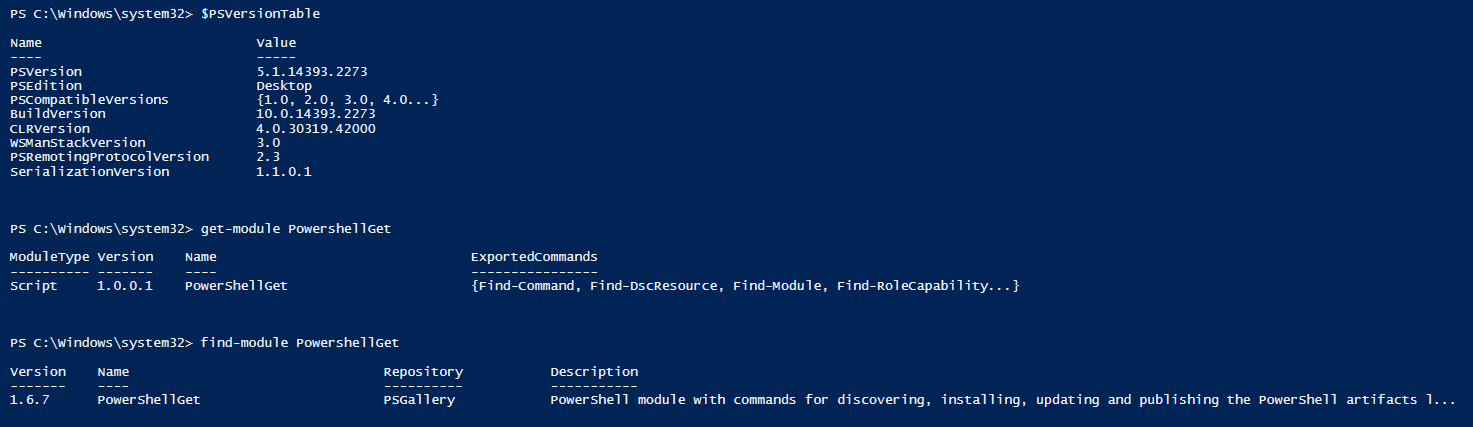
Confirm what version you are actually using
$PSVersionTable
Get-Module PowerShellGet -ListAvailable | Sort-Object Version -Descending
Find-module PowershellGet
If the version loaded from the box is very old, it may not include the prerelease parameter at all.
Fix
Install a newer copy of PowerShellGet from PSGallery:
Install-Module PowershellGet -Force
If you do not want to install it for all users, add -Scope CurrentUser:
Install-Module PowershellGet -Force -Scope CurrentUser
Then close and reopen the PowerShell session so the newer module version is picked up.
What if Update-Module fails?
That is also expected on some systems. The inbox version of PowerShellGet was not installed with Install-Module, so Update-Module cannot replace it in place. In that case, install the newer version side-by-side instead. I covered that related error here:
Current note
As of April 22, 2026, Install-Module is still the familiar PowerShellGet v2 workflow, but the newer package tooling is PSResourceGet. If you are already using that stack, the equivalent prerelease install looks like this:
Install-PSResource PSWriteWord -Prerelease