
blog
Connect-MgGraph: Keyset does not exist
This problem showed up when I tried to run a Microsoft Graph PowerShell script unattended as a scheduled task by using certificate authentication. The script worked fine for my own account, but under the service identity it failed with:
Connect-MgGraph: Keyset does not exist

What the error usually means
The message is not really about Microsoft Graph permissions. It usually means the process can see the certificate, but it cannot use the private key that belongs to it.
That often happens in one of these cases:
- the certificate is in the wrong certificate store
- the scheduled task runs under an identity that has no access to the private key
- the certificate works interactively, but the scheduled task runs under a different account or key-access context
Why the simple thumbprint approach can fail
When working interactively as a normal user, this often works:
Connect-MgGraph -CertificateThumbprint '9135E5CF311C051A' -ClientId 'a7b8a419' -TenantId '5e94ad53'
That can work when the certificate is available in a certificate store that Microsoft Graph PowerShell searches.
Scheduled tasks and service-style automation often rely on a certificate placed in LocalMachine\My. That is a supported place for thumbprint or subject-name lookup, but the scheduled task identity still needs access to the certificate's private key. If you want to be explicit while troubleshooting, you can also load the certificate object yourself and pass it with -Certificate.
Practical fix
$Thumbprint = '9135E5CF'
$LocalMachineCert = Get-ChildItem -Path Cert:\LocalMachine\My | Where-Object { $_.Thumbprint -eq $Thumbprint }

Connect-MgGraph -ClientId 'a7b8a419' -TenantId '5e94ad53' -Certificate $LocalMachineCert
If that still fails only for the scheduled task identity, the next thing to check is private key permissions on the certificate.
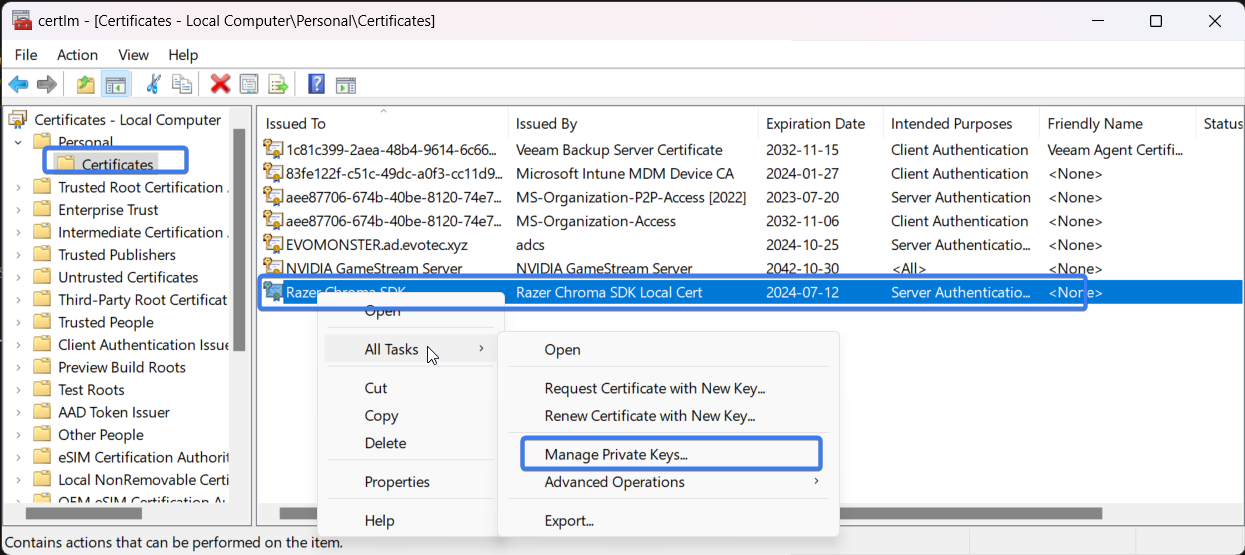
Grant the service account read access to the certificate's private key:
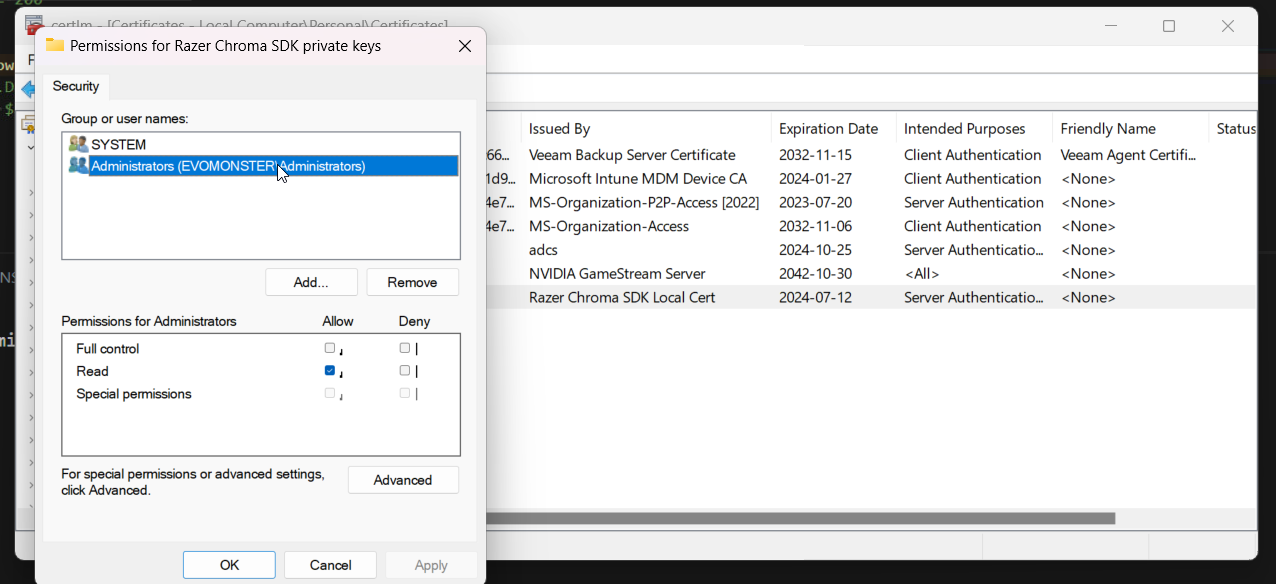
After that, the unattended connection should work as expected.
Practical takeaway
When Connect-MgGraph works for you interactively but fails in automation, think in this order:
- where is the certificate stored
- which identity is the task actually running as
- does that identity have access to the certificate's private key
That usually gets you to the real cause much faster than rechecking API permissions over and over.
Current note
Microsoft Graph PowerShell still supports app-only authentication by certificate in all of these forms:
-CertificateThumbprint-CertificateSubjectName-Certificate
The important detail from current Microsoft documentation is that thumbprint and certificate name lookup can load certificates from either Cert:\CurrentUser\My or Cert:\LocalMachine\My.
So if a scheduled task still fails with "Keyset does not exist", do not assume LocalMachine thumbprint authentication is unsupported. Focus on the practical causes instead:
- the certificate is not in the store the task can use
- the certificate does not include the private key
- the task identity cannot read the private key
- the task is running under a different account than the one used during interactive testing
Loading the certificate object manually with -Certificate is still useful when you want to remove ambiguity, but the real fix is usually certificate placement plus private-key ACLs for the account running the task.