# Sending HTML emails with PowerShell and zero HTML knowledge required
I saw this article by Altaro tweeted Building PowerShell Tools for MSPs: HTML Tables for Reporting, and it describes how you can create HTML emails with just a few lines of code. Luke created that article in 2018 (tweets from the archive I guess), but I just saw it now so thought I would make a slight comparison. In 2018 I would probably go the same way as shown by Luke Orellana, who takes a simple example of querying WMI to get disk drive sizes and send them over, formatted via Email.
blog
11 Jul 2019 es
[Ver imágenes (3)](#pf-content-image-1-0)
I saw this article by **Altaro** tweeted **Building PowerShell Tools for MSPs: HTML Tables for Reporting, **and it describes how you can create HTML emails with just a few lines of code. Luke created that article in 2018 (tweets from the archive I guess), but I just saw it now so thought I would make a slight comparison. In 2018 I would probably go the same way as shown by **Luke Orellana, **who takes a simple example of querying **WMI** to get disk drive sizes and send them over, **formatted via Email**.
### 💡 What Altaro article is all about?
The [**article**](https://www.altaro.com/msp-dojo/building-powershell-tools-msps-html-tables/) describes how you can send yourself this little table of **disk data** with some WMI query, some basic HTML and **Send-MailMessage**.
[!\[Example HTML email report from the Altaro article showing disk volumes, free space, and percent full in a table.\](/wp-content/uploads/2019/07/img_5d26da432a814.png)](/wp-content/uploads/2019/07/img_5d26da432a814.png)
```powershell
$disks = GET-WMIOBJECT win32_logicaldisk -filter "DriveType='3'"
foreach($disk in $disks)
{
$DriveLetter = $disk.DeviceID;
$SizeGB = $disk.Size / 1GB -as [int]
$FreeSpaceGB = $disk.FreeSpace / 1GB -as [int]
$PercentFree = [math]::Round((1- ($freeSpaceGB/ $sizeGB)) * 100)
$dataRow = "
$DriveLetter
$SizeGB GB
$FreeSpaceGB GB
$PercentFree %
"
$diskreport += $datarow
}
$report = "
{font-family: Arial; font-size: 13pt;}
TABLE{border: 1px solid black; border-collapse: collapse; font-size:13pt;}
TH{border: 1px solid black; background: #dddddd; padding: 5px; color: #000000;}
TD{border: 1px solid black; padding: 5px; }
## Server Space Report
Volume
Total Space
Free Space
Percent Full
$diskreport
"
Send-MailMessage -To luke@test.com -From ServerReport@test.com -Body $report -subject "Server Disk Space Report" -SmtpServer mysmtpserver.com
```
In 2018 I would probably do something similar with maybe a change to table building using **ConvertTo-HTML **as it's much easier than playing with all that **TR/TD** stuff that is shown above. Still, the main issue here is that to some degree you need to know what you're doing in **HTML**, and how those things work together to get what you see on screen.
### 💡 How I do it using Emailimo (PSWriteHTML)
But in 2019, I do stuff a bit differently. I wrote **[PSWriteHTML](https://github.com/EvotecIT/PSWriteHTML)** module, and with its the help I've created **[Emailimo PowerShell Module](https://github.com/EvotecIT/Emailimo)**. Now anytime I want to send an email I start with **Emailimo**. How to get it started and achieve the same thing as shown above? First, we need to install **Emailimo**.
```powershell
Install-Module Emailimo -AllowClobber -Force
```
When that's done and working, there's only a matter of code. The setup and getting of disk data stay mostly the same. I left it intact although I should have used **Get-CimInstance** instead of **Get-WmiObject **as it's **2019** way to work with **WMI classes**). I've only changed the way I'm building **FormattedDisk** object so that I can pass this Array of PSCustomObjects into **EmailTable** later on. I don't need the data to be in separate variables, as shown in the example above. I treat one drive as one object, and I can display it without any effort.
```powershell
$Disks = Get-WmiObject win32_logicaldisk -filter "DriveType='3'"
$FormattedDisk = foreach ($disk in $disks) {
[PSCustomObject] @{
'Volume' = $disk.DeviceID
'Total Space' = "$($disk.Size / 1GB -as [int]) GB"
'Free Space' = "$($disk.FreeSpace / 1GB -as [int]) GB"
'Percent Full' = "$([math]::Round((1 - ($freeSpaceGB / $sizeGB)) * 100))%"
}
}
Email {
EmailFrom -Address 'reminder@domain.pl'
EmailTo -Addresses "przemyslaw.klys@domain.pl"
EmailCC -Addresses "przemyslaw.klys@domain.pl"
EmailBCC -Addresses "kontakt@domain.pl"
EmailServer -Server 'mail.domain.pl' -UserName 'UserName' -Password 'C:\Support\Important\Password-Evotec-Reminder.txt' -PasswordAsSecure -PasswordFromFile
EmailOptions -Priority Low
EmailSubject -Subject 'This is a test email'
EmailBody -FontFamily 'Calibri' -Size 15 {
EmailText -Text 'Server Space Report' -FontWeight bold -Color Grey -LineBreak
EmailTable -DataTable $FormattedDisk -HideFooter
}
}
```
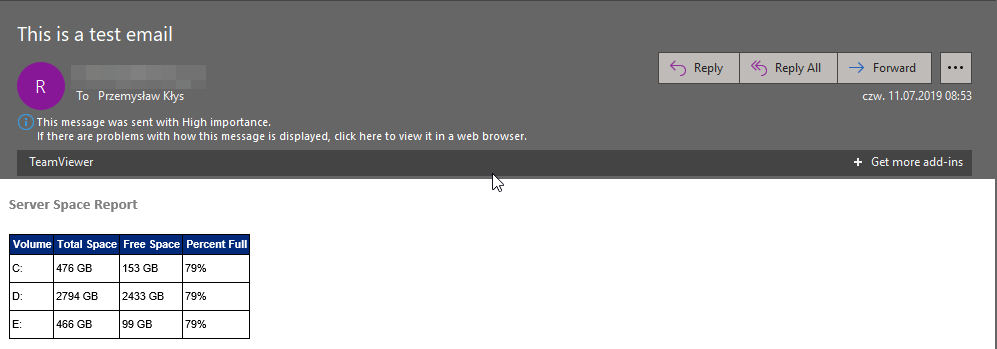
[!\[Emailimo-generated HTML email showing a clean server space report table without hand-written HTML.\](/wp-content/uploads/2019/07/img_5d26dd14a33b9.png)](/wp-content/uploads/2019/07/img_5d26dd14a33b9.png)
See? Similar output, zero **HTML** and mostly easy to read, and understand the code that you can adjust to your needs. The thing to know here is that you don't need to do pre-formatting anything to pass it to **EmailTable**. You can provide it as is, but since emails are emails, you may want to export only data you need. Here's an example with full output from **Disks** variable.
[!\[Emailimo example with the full disk object output producing too many columns for a readable email layout.\](/wp-content/uploads/2019/07/img_5d26df6376429.png)](/wp-content/uploads/2019/07/img_5d26df6376429.png)
Way too many columns for the email to be readable, and useful, but the code to generate it, mostly the same with just two added lines.
```powershell
$Disks = Get-WmiObject win32_logicaldisk -filter "DriveType='3'"
$FormattedDisk = foreach ($disk in $disks) {
[PSCustomObject] @{
'Volume' = $disk.DeviceID
'Total Space' = "$($disk.Size / 1GB -as [int]) GB"
'Free Space' = "$($disk.FreeSpace / 1GB -as [int]) GB"
'Percent Full' = "$([math]::Round((1 - ($freeSpaceGB / $sizeGB)) * 100))%"
}
}
Email {
EmailFrom -Address 'reminder@domain.pl'
EmailTo -Addresses "przemyslaw.klys@domain.pl"
EmailCC -Addresses "przemyslaw.klys@domain.pl"
EmailBCC -Addresses "kontakt@domain.pl"
EmailServer -Server 'mail.domain.pl' -UserName 'UserName' -Password 'C:\Support\Important\Password-Evotec-Reminder.txt' -PasswordAsSecure -PasswordFromFile
EmailOptions -Priority Low
EmailSubject -Subject 'This is a test email'
EmailBody -FontFamily 'Calibri' -Size 15 {
EmailText -Text 'Server Space Report' -FontWeight bold -Color Grey -LineBreak
EmailTable -DataTable $FormattedDisk -HideFooter
EmailText -LineBreak
EmailTable -DataTable $Disks -HideFooter
}
}
```
If you want to find out about [Emailimo](https://evotec.xyz/meet-emailimo-new-way-to-send-pretty-emails-with-powershell/) other features have a look on my [**earlier blog**](https://evotec.xyz/meet-emailimo-new-way-to-send-pretty-emails-with-powershell/) about it or if you prefer to see sources that are available on **[GitHub](https://github.com/EvotecIT/Emailimo)**. I do plan on working on Emailimo, by adding more features and making it prettier. Right now it has some custom stuff built-in, but if you've seen what **[PSWriteHTML](https://evotec.xyz/all-your-html-tables-are-belong-to-us/)** can do, you can expect all of that ported to **Emailimo**.
## Proyectos relacionados
Proyectos que encajan con las etiquetas, categorías y contenido de este artículo.
[Todos los proyectos](/es/proyectos/)
Buscando proyectos relacionados...
[Volver al blog](/blog)
## Artículos relacionados
- [Working with HTML in PowerShell just got better](/es/blog/working-with-html-in-powershell-just-got-better/)
- [Nested Tabs, Diagram Updates, Diagram Events, Calendar Object and more in PSWriteHTML](/es/blog/nested-tabs-diagram-updates-diagram-events-calendar-object-and-more-in-pswritehtml/)
- [Easy way to create diagrams using PowerShell and PSWriteHTML](/es/blog/easy-way-to-create-diagrams-using-powershell-and-pswritehtml/)