# Out-HtmlView – HTML alternative to Out-GridView
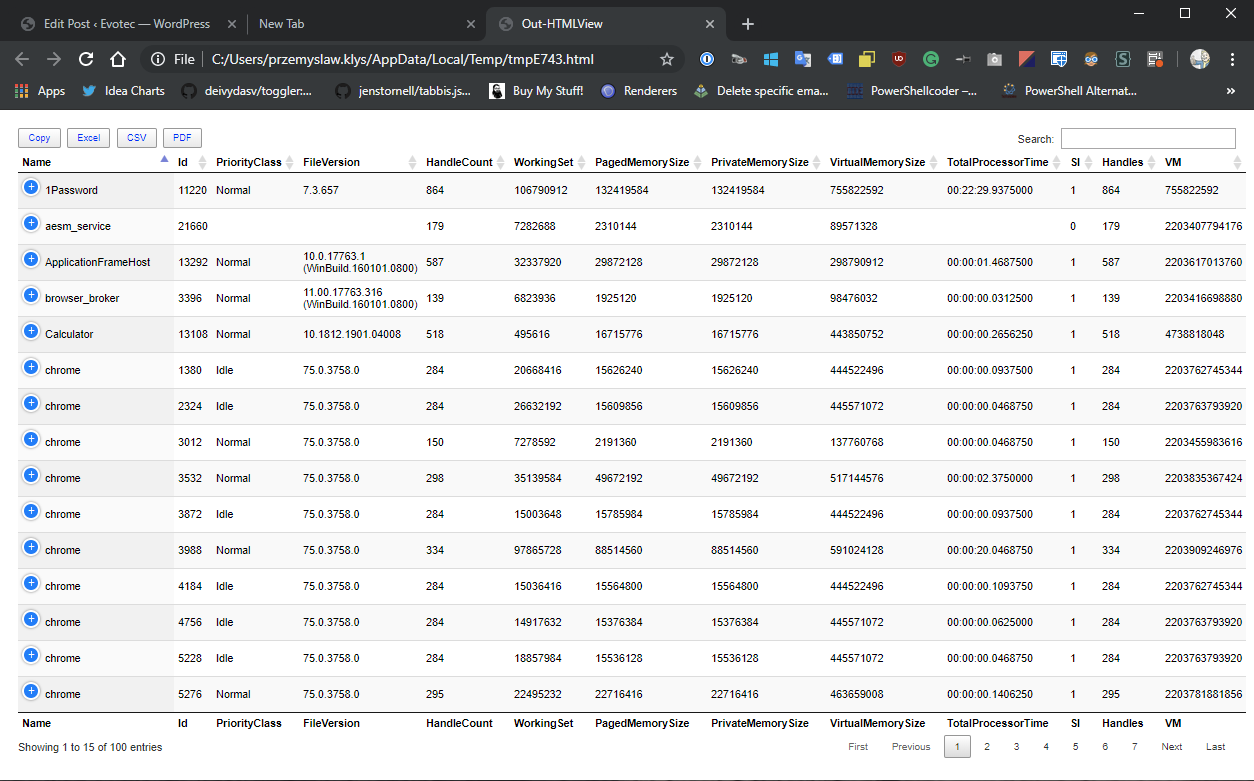
One of the most comfortable output’s in PowerShell to work and analyze data is Out-GridView. It’s handy as you can search, sort and have things done quicker than trying to do things in the console. However it’s currently not available in PowerShell Core (PowerShell 6+), and when it is available in PowerShell 7, it will NOT be cross-platform. Since I had released Dashimo a few days ago, I thought it was trivial to make a simple command out of it that could solve this problem.
blog
06 Apr 2019 fr
[Voir les images (5)](#pf-content-image-1-0)
One of the most comfortable output's in **PowerShell** to work and analyze data is **Out-GridView**. It's handy as you can search, sort and have things done quicker than trying to do things in the console. However it's currently not available in **PowerShell Core** (**PowerShell 6+**), and when it is available in **PowerShell 7**, it will **NOT** be **cross-platform**. Since I had released **[Dashimo](https://evotec.xyz/dashimo-easy-table-conditional-formatting-and-more/)** a few days ago, I thought it was trivial to make a simple command out of it that could solve this problem.
[!\[Out-HtmlView\](/wp-content/uploads/2019/04/img_5ca8f1bd9d5f1.png)](/wp-content/uploads/2019/04/img_5ca8f1bd9d5f1.png)
### 💡 PowerShell Out-HtmlView – In action on MacOS
Actually, it brings a couple of other features into the mix. It adds **export to CSV**, **export to Excel** and **export to PDF** at the same time. Here's **Out-HtmlView** in action on **MacOS**.
[!\[Out-HtmlView\](/wp-content/uploads/2019/04/Out-HtmlView.gif)](/wp-content/uploads/2019/04/Out-HtmlView.gif)
Easy to use, **sorting**, **search**, **export**, and very fast. Keep in mind that **Safari** by default has blocked running of **JavaScript** for local files. To use this function you need to enable Developer tools in Preferences, and then under menu **Develop**, you can select **“Disable Local File Restrictions”** there. **Chrome** doesn't have those limits on **MacOS** so should work straight away.
### 💡 PowerShell Out-HtmlView – In action on Windows
[!\[Out-HtmlView-Windows\](/wp-content/uploads/2019/04/Out-HtmlView-Windows.gif)](/wp-content/uploads/2019/04/Out-HtmlView-Windows.gif)
And here's a little demo on **Windows 10**. It works in **Powershell 5.1** and higher. I've not tested on lower versions, but since I never paid attention to compatibility, I doubt it will work.
### 💡 Installation and usage
**Out-HtmlView** is part of **[PSWriteHTML](https://github.com/EvotecIT/PSWriteHTML) **module. Please keep in mind that if you used it before you need to use **FORCE** parameter to make sure it updates any other required modules.
```powershell
Install-Module PSWriteHTML -Force
```
Usage is as easy as it gets
```powershell
Get-Process | Select-Object -First 100 |Out-HtmlView
Get-Process | Select-Object -First 5 |Out-HtmlView
# Keep in mind that Get-Process holds a lot of data so displaying all rows will take a minute to generate
Get-Process | Out-HtmlView
Get-ChildItem | Out-HtmlView
```
[!\[Get-Process rendered in an interactive HTML table using Out-HtmlView as an alternative to Out-GridView.\](/wp-content/uploads/2019/04/img_5ca8f2b67da61.png)](/wp-content/uploads/2019/04/img_5ca8f2b67da61.png)[!\[Get-ChildItem displayed in the browser through Out-HtmlView with sortable HTML output.\](/wp-content/uploads/2019/04/img_5ca8f2d5adc55.png)](/wp-content/uploads/2019/04/img_5ca8f2d5adc55.png)
PS. I've created an alias for **Out-HtmlView** to **Out-GridHtml** so that it can be easier for people having a habit typing **Out-GridView** on **MacOs** or **Linux**.
## Projets associés
Projets liés aux tags, catégories et au contenu de cet article.
[Tous les projets](/fr/projets/)
Recherche des projets associés...
[Retour au blog](/blog)
## Articles associés
- [PSTeams – Send notifications to MS Teams from Mac / Linux or Windows](/fr/blog/psteams-send-notifications-to-ms-teams-from-mac-linux-or-windows/)
- [PowerShell Core – The type initializer for Gdip threw an exception.](/fr/blog/powershell-core-the-type-initializer-for-gdip-threw-an-exception/)
- [Check an API write after a PowerShell timeout](/fr/blog/verify-uncertain-api-outcomes-powershell/)