

blog
Altaro VM Backup taking lots of space for CBT backups on system drive

When Altaro VM Backup introduced CBT (Change Block Tracking) for faster incremental backups, the performance gain was genuinely useful. The downside in one of my environments was that shortly after enabling it, the backup host started losing space on the system drive much faster than expected.
Symptom
After installation, the host started running out of disk space. A quick check with TreeSize showed the unexpected growth was coming from:
C:\ProgramData\Altaro\AltaroBackupProfile\CbtTrackingData\
In the original case, that folder consumed 32.4 GB in just two days.
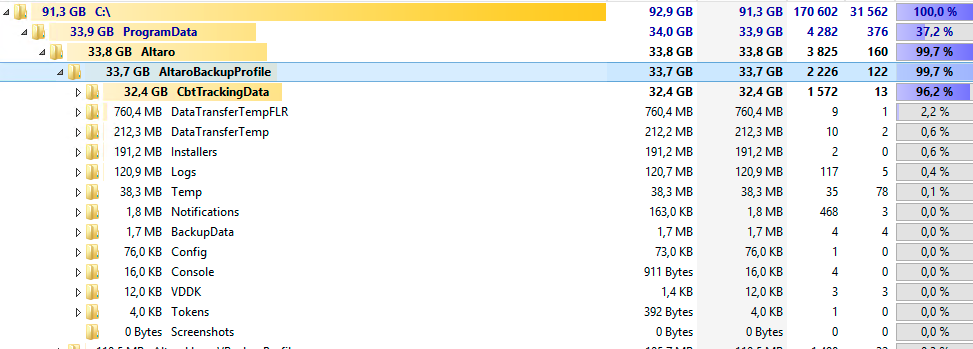
At first it looked like a local misconfiguration, but after checking with Altaro Support, the fix turned out to be straightforward.
Fix
The recovery steps were:
- Restart the Altaro services.
- Delete the
CbtTrackingDatafolder:C:\ProgramData\Altaro\AltaroBackupProfile\CbtTrackingData\
- Update Altaro VM Backup to the newer build available at the time.
Why this matters
The real danger here is not the wasted space itself. It is that backup infrastructure issues tend to show up first as "just another disk warning" and then quickly turn into failed jobs, stuck services, or a host that cannot function normally because the system volume is full.
If you recently enabled CBT and your system drive starts growing unexpectedly, this folder should be one of the first things you inspect.
Current note
Altaro's backup product is now marketed as VM Backup under Hornetsecurity, but CBT remains a core feature in the platform. So while the exact version numbers in this post are historical, the troubleshooting pattern is still relevant: unexpected growth under ProgramData\Altaro\AltaroBackupProfile\... is worth investigating immediately.