

blog
Get-EventLog shows wrong maximum size of event logs
While working on an event-management script, I noticed that Get-EventLog was not returning the correct value for Maximum File Size. In the Event Log properties window, the configured maximum size was clearly 2 TB.
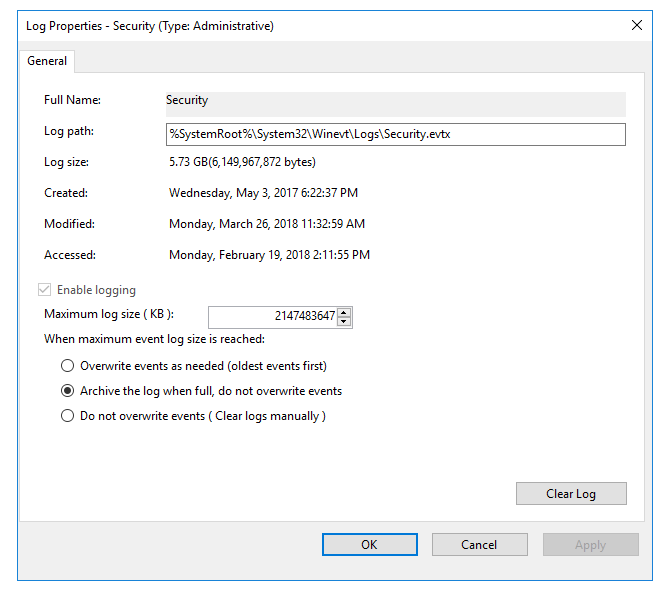
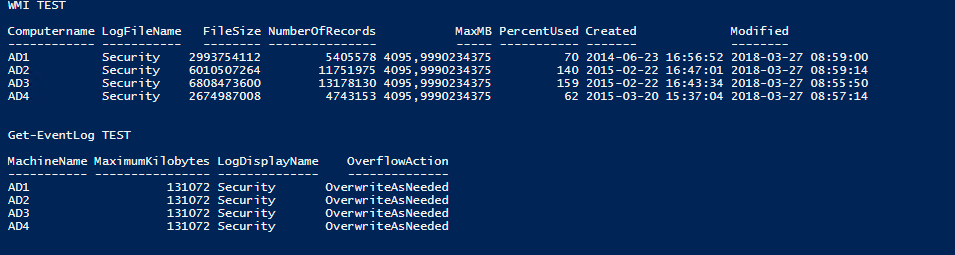
But the methods I was testing in PowerShell were showing something completely different.
cls

$Computers = Get-ADDomainController -Filter *
$logs = Get-WmiObject Win32_NTEventlogfile -ComputerName $Computers
$logsOutput = $logs | Select
@{Name = "Computername"; Expression = {$_.CSName}},
LogFileName,
FileSize,
NumberOfRecords, @{Name = "MaxMB"; Expression = {$_.MaxFileSize / 1MB}},
@{Name = "PercentUsed"; Expression = { ($_.filesize / $_.maxfilesize) * 100 -as [int]}},
@{Name = "Created"; Expression = {$_.ConvertToDateTime($_.CreationDate)}},
@{Name = "Modified"; Expression = {$_.ConvertToDateTime($_.Lastmodified)}}
$results2 = $logsOutput | Select-Object * | Where-Object { $_.LogFileName -eq "Security" }
$results1 = Get-EventLog -List -ComputerName $computers | Select-Object MachineName, MaximumKilobytes, LogDisplayName, OverflowAction | Where-Object { $_.LogDisplayName -eq "Security" }

Write-Host "WMI TEST"
$results2 | Format-Table -AutoSize
Write-Host "Get-EventLog TEST"
$results1 | Format-Table -AutoSize
The important part here is that the Maximum Log File Size reported by Get-EventLog or the older WMI method did not match what the log was actually configured to use.
Better approach
The better option turned out to be Get-WinEvent, which exposes the log metadata more accurately for this scenario.
$results = @()
foreach ($computer in $computers) {
    $results += Get-WinEvent -ListLog Security -ComputerName $computer | Select MaximumSizeInBytes, FileSize, IsLogFul, LastAccessTime, LastWriteTime, OldestRecordNumber, RecordCount, LogName, LogType, LogIsolation, IsEnabled, LogMode
}

Write-Host "Get-WinEvent TEST"
$results | ft -AutoSize
The results were much better and showed the proper 2 TB value in MaximumSizeInBytes.

Practical takeaway
If you are reporting on event log configuration and the exact maximum size matters, do not assume Get-EventLog is the best source just because it is familiar. For richer metadata, especially when dealing with modern eventing APIs, Get-WinEvent -ListLog is often the better choice.